I was testing SharePoint upgrade from MOSS 2007 to SharePoint 2010 Beta. Since, I am using Virtual Machine (VM) it's a good practice to take a snap shot before performing any upgrade. The following is a screen shot of the c:\windows\assembly that shows the polices before installing MOSS SP2:
As we notice no SharePoint policies available. After installing MOSS 2007 the polices were still the same and the installation added SharePoint DLL as shown below:
After running the SharePoint Configuration Wizard and configured the farm no changes were made to the assembly folder. So, I created a new site collection I ran the preupgradecheck command: stsadm -o preupgradecheck
I was expecting the above result since everything is OOB. So, I continued and installed the pre-requisites for SharePoint 2010 Beta and after that ran the configuration wizardry to upgrade from MOSS 2007 to SharePoint 2010
After clicking Install Now button, the installation process kicked in and installed the SharePoint 2010 binaries. I checked the c:\windows\assembly after I had installed the binaries and found the following new folders:
The previous list is only SharePoint specific (Installation would include other folders for office and PerformancePoint). After I had installed the binaries, I ran the configuration wizard: 
Selected Preserve the look and feel of existing SharePoint sites, and allowed users to update their sites' users experience and clicked on Next
So, the configuration wizard completed successfully, and as usual checked the assembly folder: 
So the configuration wizard added policy folders as shown above. I went to Central Administration site to check on the status of the upgrade and it failed:
Checking the log and I believe the source of the errors is the SSP since they point to users profiles (I believe I didn't import users profile and maybe that's why I got the following error) :
[OWSTIMER] [UserProfileSharedResourceProvider12Sequence] [ERROR] [4/22/2010 4:40:43 PM]: Action 14.0.1.0 of Microsoft.Office.Server.Upgrade.UserProfileSharedResourceProvider12Sequence failed. [OWSTIMER] [UserProfileSharedResourceProvider12Sequence] [ERROR] [4/22/2010 4:40:43 PM]: Inner Exception: There are no online service instances for this application. [OWSTIMER] [UserProfileSharedResourceProvider12Sequence] [ERROR] [4/22/2010 4:40:43 PM]: at Microsoft.SharePoint.SPConnectedServiceApplication.get_ApplicationAddresses() at Microsoft.SharePoint.SPServiceLoadBalancer.<get_EndpointAddresses>d__0.MoveNext() at Microsoft.SharePoint.SPRoundRobinServiceLoadBalancer.GetEndpoints(IEnumerable`1 applicationAddresses) at Microsoft.SharePoint.SPRoundRobinServiceLoadBalancer.BeginOperation() at Microsoft.Office.Server.UserProfiles.MossClientBase`1.get_Channel() at Microsoft.Office.Server.UserProfiles.MossClientBase`1.ExecuteOnChannel(String operationName, CodeBlock codeBlock) at Microsoft.Office.Server.UserProfiles.ProfilePropertyServiceClient.ExecuteOnChannel(String operationName, CodeBlock codeBlock) [OWSTIMER] [UserProfileSharedResourceProvider12Sequence] [ERROR] [4/22/2010 4:40:43 PM]: Exception: There are no online service instances for this application. [OWSTIMER] [UserProfileSharedResourceProvider12Sequence] [ERROR] [4/22/2010 4:40:43 PM]: at Microsoft.Office.Server.UserProfiles.ProfilePropertyServiceClient.ExecuteOnChannel(String operationName, CodeBlock codeBlock) at Microsoft.Office.Server.UserProfiles.ProfilePropertyServiceClient.GetProfileProperties() at Microsoft.Office.Server.Administration.UserProfileApplicationProxy.RefreshProperties(Guid applicationID)
I needed to revert back to MOSS 2007, so I though by un-installing SharePoint 2010 Beta and repairing MOSS 2007 I would be able to create a new farm and configure users profile before running the upgrade. I did un-install SharePoint, during the removal process the following message box popped up and I selected No option:
From control panel I went ahead and repaired MOSS 2007
The wizard completed without issues as shown below:
So, I hit Close and launch the configuration wizard and got the following error: 
Description: Stopped working Problem signature: Problem Event Name: CLR20r3 Problem Signature 01: psconfigui.exe Problem Signature 02: 12.0.6413.1000 Problem Signature 03: 4902dc1f Problem Signature 04: psconfigUI Problem Signature 05: 12.0.0.0 Problem Signature 06: 4902dc1f Problem Signature 07: 15 Problem Signature 08: 14 Problem Signature 09: System.IO.FileNotFoundException OS Version: 6.1.7600.2.0.0.274.10 Locale ID: 1033 Read our privacy statement online: http://go.microsoft.com/fwlink/?linkid=104288&clcid=0x0409 If the online privacy statement is not available, please read our privacy statement offline: C:\Windows\system32\en-US\erofflps.txt
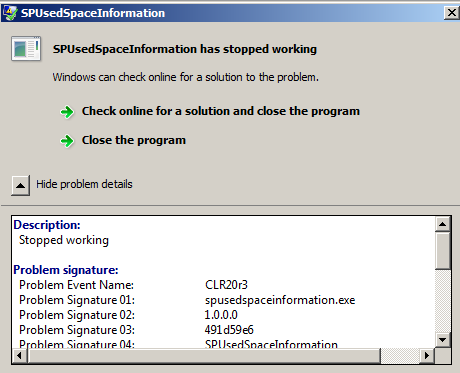
Tried to reboot the server and that didn't fix the issue, I even tried to remove the MOSS 2007 and got the same error as shown below:
I searched for the error and found
MS forum. I followed the suggesting that deal with assembly folders: " remove spserver2010beta. install wss3.0sp2 or moss2007sp2. If you try to run psconfigui/psconfig (configuration wizard) at this point, u get the clr20r3 error. now log on to your server with local administrative rights. go to c:\windows\assembly\gac_msil. Find all sharepoint 12.0.0 policy folders (four of them). cd inside, open the config files and remove the redirect binding tags. psconfig/psconfgui should run now." In my scenario:
- SharePoint 2010 was already un-installed
- Had to follow the following instructions to get to c:\Windows\assembly\gac_msil
i. start > run > cmd
ii.cd\windows\assembly
iii.Type: attrib -r -h -s desktop.ini
iv.Type: ren desktop.ini desktop.bak

3. Browsed to c:\Windows\assembly\GAC_MSIL and looked for the SharePoint Policies as shown
below:

4. Opened the config file for each of the SharePoint Policies and removed
tag

5. Opened the IIS Manager and deleted Application Pool and SharePoint sites that got created by
MOSS before running the configuration wizard for MOSS 2007.

6. Did an IIS reset and launched the configuration wizard for MOSS 2007
7. The configuration wizard ran without any issues.
8. Tried to create a new site collection based on Team template got the following error:
Feature '6c09612b-46af-4b2f-8dfc-59185c962a29' could not be installed because the loading of event receiver assembly "Microsoft.Office.Workflow.Feature, Version=12.0.0.0, Culture=neutral, PublicKeyToken=71e9bce111e9429c" failed: System.IO.FileNotFoundException: Could not load file or assembly 'Microsoft.Office.Workflow.Feature, Version=14.0.0.0, Culture=neutral, PublicKeyToken=71e9bce111e9429c' or one of its dependencies. The system cannot find the file specified. File name: 'Microsoft.Office.Workflow.Feature, Version=14.0.0.0, Culture=neutral, PublicKeyToken=71e9bce111e9429c' ---> System.IO.FileNotFoundException: Could not load file or assembly 'Microsoft.Office.Workflow.Feature, Version=12.0.0.0, Culture=neutral, PublicKeyToken=71e9bce111e9429c' or one of its dependencies. The system cannot find the file specified. File name: 'Microsoft.Office.Workflow.Feature, Version=12.0.0.0, Culture=neutral, PublicKeyToken=71e9bce111e9429c' WRN: Assembly binding logging is turned OFF. To enable assembly bind failure logging, set the registry value [HKLM\Software\Microsoft\Fusion!EnableLog] (DWORD) to 1. Note: There is some performance penalty associated with assembly bind failure logging. To turn this feature off, remove the registry value [HKLM\Software\Microsoft\Fusion!EnableLog]. at System.Reflection.Assembly._nLoad(AssemblyName fileName, String codeBase, Evidence assemblySecurity, Assembly locationHint, StackCrawlMark& stackMark, Boolean throwOnFileNotFound, Boolean forIntrospection) at System.Reflection.Assembly.InternalLoad(AssemblyName assemblyRef, Evidence assemblySecurity, StackCrawlMark& stackMark, Boolean forIntrospection) at System.Reflection.Assembly.InternalLoad(String assemblyString, Evidence assemblySecurity, StackCrawlMark& stackMark, Boolean forIntrospection) at System.Reflection.Assembly.Load(String assemblyString) at Microsoft.SharePoint.Administration.SPFeatureDefinition.get_ReceiverObject()
9. Ran the configuration wizard and disconnected from the farm, and then completely removed
MOSS 2007, rebooted the machine and re-installed it again, and got the same error.
10. I had to go back to the c:\windows\assembly folder and removed
tag
from the following folders:

11. Did an iisreset and went back to Central Admin page and created a new site collection…Viola!!!
It worked…mmmmm..
12. Completely configured the SharePoint farm and imported users profiles this time, and thoroughly
tested all the main features and could not find any outstanding issues. Everything seems to be
working as expected and the application log was clean.
13. This time I did install the latest CU for MOSS 2007 (downloaded and installed February CU),
ran the preupgradecheck and read MS Technet
Upgrade in place to SharePoint Server 2010.

14. Before performing the upgrade, I took a snap shot of my VM, just in case I need to do the upgrade
again without configuring SSP on MOSS 2007 farm.
15. Installed SharePoint 2010 Beta and did in-place upgrade again, then ran the configuration wizard
again and the upgrade failed again with the same errors as mentioned previously.
16. Reverted back MOSS 2007 and created a new SharePoint farm without an SSP, ran
preupgradecheck, and then upgraded to SharePoint 2010 Beta. This time the upgrade worked.
Lessons learned:
- Use Microsoft articles on SharePoint upgrade best practices which are posted on MS site.
- Always backup your databases, and if you are running SharePoint on Virtual Environment take a snap shot.
- I would strongly advise against using the "hacked" way of modifying features files/folders in c:\windows\assembly . If something goes wrong then start over again.
I will see if I can do an in-place upgrade to MOSS farm that has SSP. At this point, I have tried it several times and it failed with the same errors. I guess that's all for now.
Update:
======
I have just installed the SharePoint 2010 RTM (not the Beta edition) and the upgrade completed successfully.... Hurray.